Payload conversion - Java SDK
Payload Converters serialize your application objects into a Payload and deserialize them back.
A Payload is a binary form with metadata that Temporal uses to transport data.
By default, Temporal uses a Payload Converter that handles null, byte arrays, protobuf messages, and anything JSON-serializable.
You only need a custom Payload Converter when your application uses types that aren't natively supported.
Default supported types
The default Data Converter supports converting multiple types including:
null- Byte arrays
- Protobuf JSON: if a value is an instance of a Protobuf message, it is encoded with proto3 JSON
- Jackson JSON
- Anything that can be converted to JSON
Using custom Payload conversion
Temporal SDKs provide a Payload Converter that can be customized to convert a custom data type to Payload and back.
Implementing custom Payload conversion is optional. It is needed only if the default Data Converter does not support your custom values.
To support custom Payload conversion, create a custom Payload Converter and configure the Data Converter to use it in your Client options.
The order in which your encoding Payload Converters are applied depend on the order given to the Data Converter. You can set multiple encoding Payload Converters to run your conversions. When the Data Converter receives a value for conversion, it passes through each Payload Converter in sequence until the converter that handles the data type does the conversion.
Payload Converters can be customized independently of a Payload Codec. Temporal's Converter architecture looks like this:
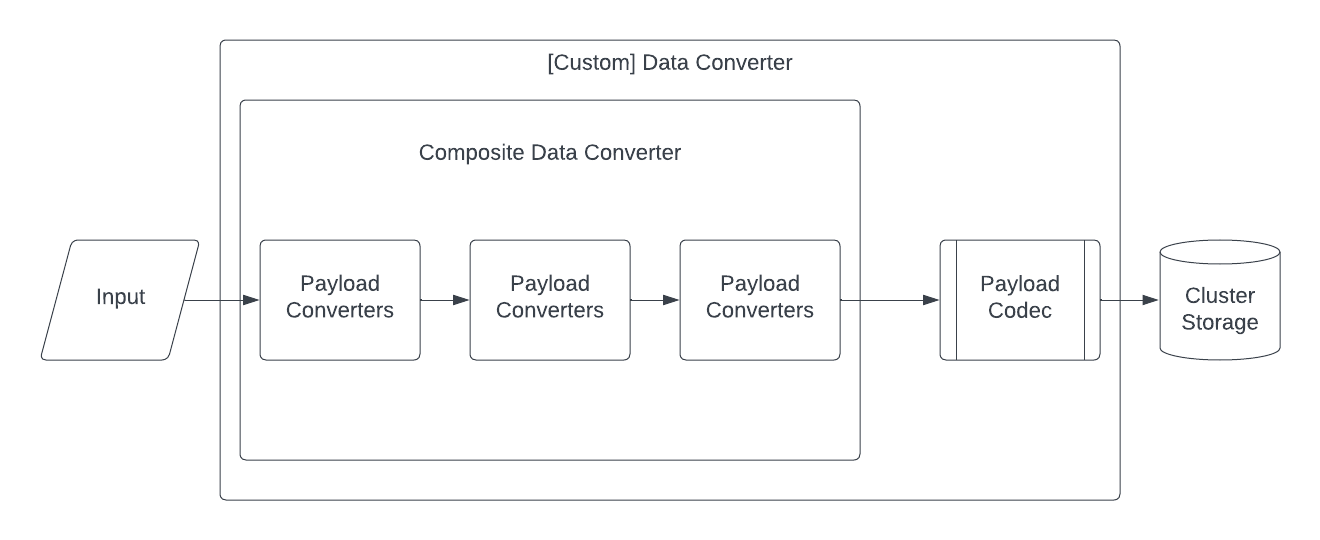
Temporal converter architecture
Create a custom implementation of a PayloadConverter interface and use the withPayloadConverterOverrides method to implement the custom object conversion with DefaultDataConverter.
PayloadConverter serializes and deserializes method parameters that need to be sent over the wire.
You can create a custom implementation of PayloadConverter for custom formats, as shown in the following example:
/** Payload Converter specific to your custom object */
public class YourCustomPayloadConverter implements PayloadConverter {
 //...
  @Override
  public String getEncodingType() {
    return "json/plain"; // The encoding type determines which default conversion behavior to override.
  }

  @Override
  public Optional<Payload> toData(Object value) throws DataConverterException {
      // Add your convert-to logic here.
  }

  @Override
  public <T> T fromData(Payload content, Class<T> valueClass, Type valueType)
      throws DataConverterException {
    // Add your convert-from logic here.
  }
//...
}
You can also use specific implementation classes provided in the Java SDK.
For example, to create a custom JacksonJsonPayloadConverter, use the following:
//...
private static JacksonJsonPayloadConverter yourCustomJacksonJsonPayloadConverter() {
  ObjectMapper objectMapper = new ObjectMapper();
  // Add your custom logic here.
  return new JacksonJsonPayloadConverter(objectMapper);
}
//...
To set your custom Payload Converter, use it with withPayloadConverterOverrides with a new instance of DefaultDataConverter in your WorkflowClient options that you use in your Worker process and to start your Workflow Executions.
The following example shows how to set a custom YourCustomPayloadConverter Payload Converter.
//...
DefaultDataConverter ddc =
        DefaultDataConverter.newDefaultInstance()
            .withPayloadConverterOverrides(new YourCustomPayloadConverter());

    WorkflowClientOptions workflowClientOptions =
        WorkflowClientOptions.newBuilder().setDataConverter(ddc).build();
//...